
Days Between Dates Calculator
How many days are there between two dates? Enter a start and end date to get the exact count, with or without the end day, broken down into years, months and days, weeks and days, and business days after removing weekends and any holidays you list. Switch to “add days” mode to find the date a number of days or business days from a start date.
- Free to use
- No sign-up
- Runs in your browser

Days between dates
Use complete dates with a year. Between-dates mode counts from the earlier date up to, but not including, the later date by default; choose the inclusive option to count both. Reversed dates give a negative Days total, while the other totals describe the positive span.
Add or subtract days uses a signed whole number: negative values move backward. The start date is not one of the added business days, and the inclusive setting does not affect this mode. Weekend choices and your holiday list apply to business-day results in both modes.
Date Planning Pack
Printable and Excel date tools: a business-day calculator workbook with holiday list, a day-of-year chart, a days-between chart for month ends, a leave tracker and a deadline planner.
- Business days (XLSX)
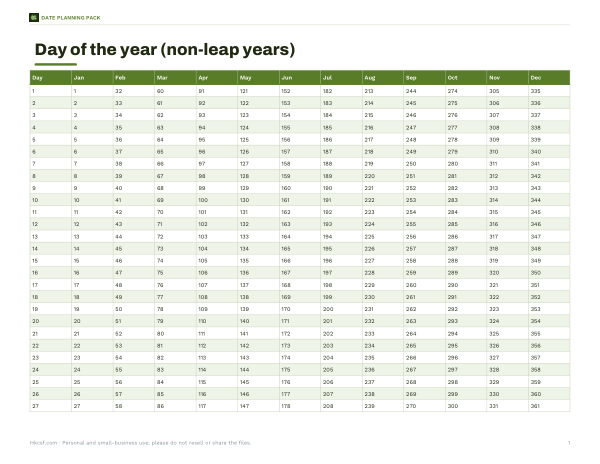
- Day-of-year chart (PDF)
- Leave tracker (XLSX)
- Deadline planner (DOCX/PDF)
Formats: XLSX, PDF, DOCX. Instant download after payment (link valid 72 hours, up to 5 downloads). AI-assisted: the templates were drafted with AI help and reviewed and laid out before publishing.
$5.00 USD, one-time 4 files · about $1.25 each
- Instant download
- 7-day refund
- Secure checkout by Stripe
7-day money-back guarantee. Full refund within 7 days of purchase, even after you download.
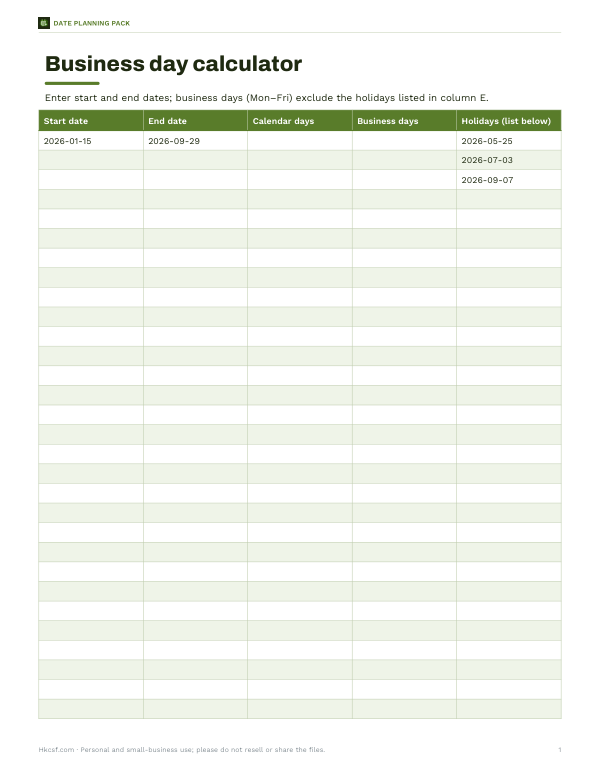
Free sample: Business Day Calculator (PDF, 55 KB)
Full refund within 7 days — see the refund policy and license.
Free printables
Single sheets you can print right now, no sign-up. The full pack adds every sheet in one download plus the editable files.
 Printable Deadline Planner
Inclusive or exclusive?
The standard way to count days between two dates excludes the end date: from 1 March to 2 March is 1 day. That is how most calculators, spreadsheets (=B1−A1) and programming languages work. But if you are counting days of an event, a hotel stay in nights versus days, or a leave period where both the first and last days count, you need to include both ends — which adds one. The calculator lets you choose, and shows the difference clearly.
What you get
| Result | How it is worked out |
|---|---|
| Days | Calendar days between the dates (plus one if inclusive) |
| Years, months, days | Whole years, then whole months, then remaining days — like an age |
| Weeks and days | Days split into 7-day weeks |
| Business days | Days that are not weekend days and not in your holiday list |
| Weekend days | Days falling on your chosen weekend |
| Hours and minutes | Days × 24 and × 1,440 (ignoring daylight-saving shifts) |
Business days and holidays
Business days exclude weekends — Saturday and Sunday by default, or Friday and Saturday for much of the Middle East, or Sunday only for six-day working weeks. Public holidays differ by country and region, so the calculator doesn’t guess them: paste the dates that apply to you, one per line. The same rules apply in “add days” mode, so you can find a deadline such as “30 business days from today”.
How to use the calculator
- Choose “Days between two dates” or “Add or subtract days”.
- Enter the start date (and end date, or the number of days to add).
- Choose whether to include the end date.
- Pick your weekend and paste any holidays.
- Read the results and the month-by-month breakdown.
Days between dates: examples
These examples use Saturday and Sunday as weekends. Only the first row excludes holidays: 2026-05-25, 2026-07-03 and 2026-09-07.
| Start date | End date | Count end date? | Calendar days | Business days |
|---|---|---|---|---|
| 2026-01-15 | 2026-09-29 | No | 257 | 180 |
| 2026-03-02 | 2026-03-09 | No | 7 | 5 |
| 2026-03-02 | 2026-03-09 | Yes | 8 | 6 |
| 2028-02-28 | 2028-03-01 | No | 2 | 2 |
From today or until today
Read today’s date from your device and type it into Start date or End date. The inputs start with example dates; there is no automatic Today button. Check the year when a period crosses New Year.
Leap years and month ends
The Days total uses UTC calendar dates, including February 29 in leap years. The years, months, days breakdown counts whole months from the earlier date, keeping its original day number or clamping to the last day of a shorter target month. It takes the largest whole-month offset that does not pass the later endpoint, then counts the remaining calendar days. Twelve whole months make one year; all three components are non-negative. To rebuild the endpoint, add years and months together as one month offset (12 × years + months), clamp once, then add the remaining days. Anchoring each offset to the original date prevents repeated month-end clamping from shifting later months. For example, 2026-01-31 to 2026-03-01 is 0 years, 1 month, 1 day: January 31 plus one month clamps to February 28, then one day reaches March 1. Reversed inputs use the earlier date as the breakdown start, while Days keeps its negative sign. With Count end date enabled, the breakdown endpoint is one day after the later input date, so the whole end date is included.
Counting in spreadsheets
| Task | Excel / Google Sheets formula |
|---|---|
| Days between A1 and B1 | =B1-A1 |
| Inclusive days | =B1-A1+1 |
| Business days (Mon–Fri) | =NETWORKDAYS(A1,B1,holidays) |
| Business days, custom weekend | =NETWORKDAYS.INTL(A1,B1,7,holidays) (7 = Fri–Sat) |
| Add business days | =WORKDAY(A1,30,holidays) |
| Years, months, days | =DATEDIF(A1,B1,"y"), "ym", "md" |
Note that NETWORKDAYS counts both the start and end dates if they are working days, while simple subtraction excludes the end date — one reason results can differ by a day between tools.
Day-count conventions in finance
Interest calculations use formal day-count conventions. “Actual/365” uses the real number of days divided by 365; “Actual/360”, common for money-market loans, divides by 360; and “30/360” treats every month as 30 days. The same period can therefore produce slightly different interest amounts. This calculator gives the actual day count, which is the starting point for the actual-based conventions.
Why results sometimes differ
- One tool includes the end date and another does not.
- Business-day counts may or may not include the start date.
- Holiday lists differ between countries, states and employers.
- Month-and-day breakdowns handle month ends differently (31 January plus one month).
- Some tools count calendar days in local time, which can shift a day around midnight.
Time zones
Dates are treated as whole calendar days without times, so time zones and daylight-saving changes do not affect the count. If you need a precise difference between two times, convert both to the same time zone first.
Privacy
Everything runs in your browser; nothing is uploaded.
Frequently asked questions
How do I calculate the days between two dates?
Subtract the start date from the end date; add one if you want to include both days.
Does the count include the end date?
Not by default; choose the inclusive option to count both dates.
How many business days are between two dates?
The calculator excludes weekends and any holidays you list.
Can I add business days to a date?
Yes, use Add or subtract days mode; it shows both calendar and business-day results.
Does it handle leap years?
Yes, it uses the real calendar.
How many days are in a year?
365, or 366 in a leap year.
What is 90 days from today?
Set Start date to today’s date from your device, choose Add or subtract days and enter 90. The form does not automatically replace its example start date with today.
Why is my count different from a spreadsheet?
Spreadsheets subtract dates (excluding the end date) but NETWORKDAYS includes both ends; check which convention you need.
Can I count only weekdays?
Yes, the business days result counts weekdays minus your listed holidays.
Is anything uploaded?
No, it runs in your browser.
Are public holidays filled in automatically?
No. The form contains example holidays. Replace them with dates that apply to your calendar, one YYYY-MM-DD date per line. A holiday already on a chosen weekend is not subtracted twice.
Can I subtract days or reverse the date range?
Enter a negative whole number in Add or subtract days to move backward. In between-dates mode, a reversed range changes the sign of Days; business days and the other span totals remain positive.